Captain Ratatype

Touch typing is a vital skill for anyone looking to achieve digital fluency and make the most of their time. At Ratatype, we examined data from hundreds of thousands of users and discovered that keyboard games can help shave off up to 8% of typing time, whilst consistent practice with a typing tutor can reduce it by up to 15%. All of this simply by keying in text more quickly.
So it's perfectly reasonable to ask: «Where can one learn to type at speed?»
There's a wealth of different platforms for mastering touch typing: for youngsters, grown-ups, professional purposes, and beyond. Some typing tutors work directly in your browser, whilst others require installation on a laptop or desktop computer.
How to select a typing tutor
When picking a platform to boost your typing speed, consider the following:
- whether the site provides a complete typing course or merely a handful of repetitive exercises;
- whether the platform caters for the language version you require;
- whether there's a typing speed test to monitor your progress;
- whether supplementary learning tools are on offer, such as games;
- the pricing and whether a free version is available;
- for educators — whether the platform permits classroom management.
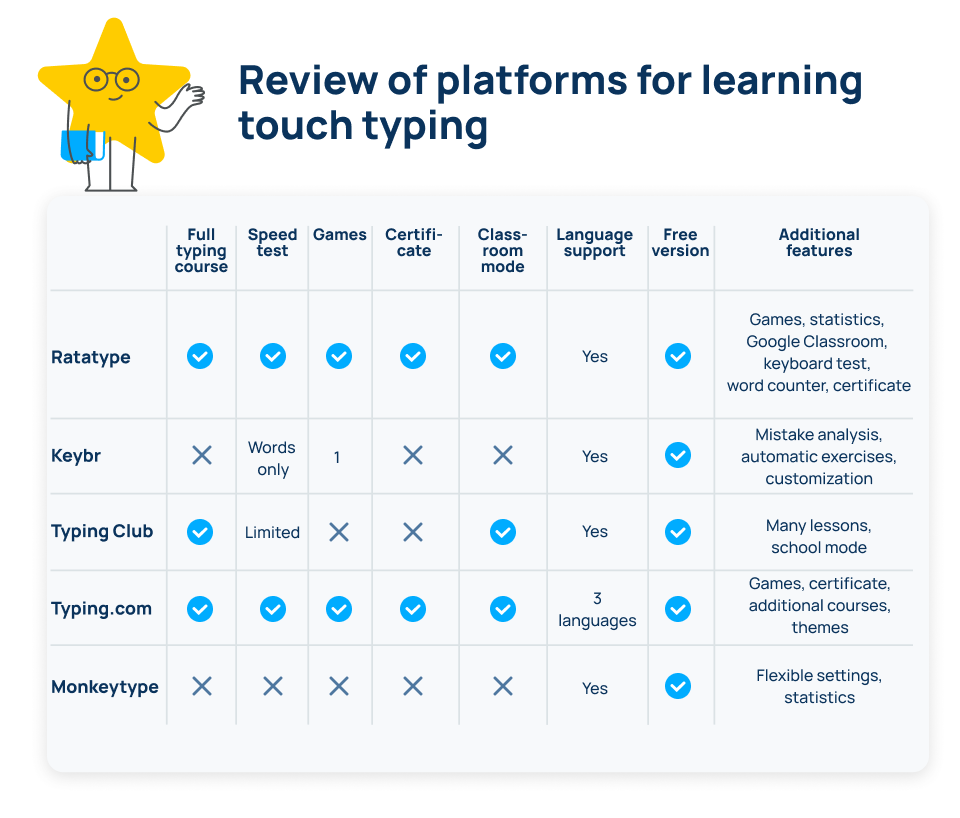
Below is a rundown of online platforms for learning touch typing.
1. Ratatype — an online platform for mastering touch typing for youngsters and adults
The standout feature of this platform is its engaging and vibrant interface. It works brilliantly for any audience. Ratatype also distinguishes itself through additional services and tools, including a keyboard test.
Services
- Ratatype typing tutor
- Typing speed test for 1, 2, and 5 minutes
- Typing games: Ratashooter — a typing shooter game and Ratarace — typing races
- Services for teachers: class creation, Google Classroom synchronisation
- Word counter
- Keyboard test
- Learning statistics
- Typing speed certificate
Paid version
- Free.
- You can purchase an advert-free version with unlimited exercises and access to dark mode.
Language support
Lessons on Ratatype are available in 10 languages:
- English;
- Ukrainian;
- French;
- Italian;
- Spanish;
- German;
- Portuguese;
- Polish;
- Turkish;
- Dutch.
2. Keybr — a tutor for honing accuracy
The Keybr typing tutor assists in improving typing precision and automatically tailors exercises based on your errors. No frills — just focused learning.
Features
- typing tutor;
- typing speed test (words only);
- error analysis;
- statistics;
- automatic exercises;
- typing races;
- various colour themes and fonts.
Paid version
- Free.
Languages
20+ languages, including:
- English;
- German;
- French;
- Spanish;
- Italian;
- Portuguese;
- and others.
3. TypingClub — a thorough course for mastering touch typing
TypingClub provides a vast array of lessons. It's particularly well-suited for teaching children.
Features
- one extensive course comprising several hundred exercises;
- interactive exercises;
- statistics;
- classroom mode.
Paid version
- A free version is available.
- The paid version removes adverts and unlocks additional features.
Languages
20+ interface languages, including:
- English;
- French;
- Spanish;
- German;
- Polish;
- Slovenian;
- and others.
4. Typing.com — a versatile typing tutor
Typing.com brings together lessons, games, and a typing speed test. It's a substantial and well-established project that does precisely what it sets out to do.
Features
- typing course;
- several typing games;
- typing speed certificate;
- typing speed test;
- teacher mode;
- different interface themes.
Paid version
- A free version is available.
- There's paid advert-free learning plus additional services (coding, digital literacy).
Languages
- English;
- Spanish;
- Portuguese.
5. Monkeytype — a typing speed test service
Monkeytype is ideal for those who can already type and wish to achieve truly impressive results. There are no extra bells and whistles or supplementary services — just dedicated practice.
Features
- various types of speed tests (by time, by text, by words, with quotations);
- statistics;
- custom text options;
- customisable interface settings.
Paid version
Free.
Languages
- multilingual support;
- programming languages.
Conclusion
If you only require a speed test — Monkeytype or Keybr will do the trick.
If you need a thorough course — TypingClub or Typing.com.
If you're after an all-in-one platform with a course, games, tests, certificates, and classroom learning options — Ratatype offers the most comprehensive feature set amongst free services.
FAQ — frequently asked questions about touch typing
How long does it take to learn to type quickly?
On average — 2–4 weeks of regular practice for 10–15 minutes daily.
What typing speed is considered good?
- 40–50 words per minute — average level;
- 60–80 — good;
- 80+ — excellent.
Can an adult learn touch typing?
Absolutely. Age is irrelevant. The key is consistent practice.
Which typing tutor is the best?
It depends on what you're aiming for:
- for learning — tutors with a structured course;
- for practice — speed tests;
- for children — gamified platforms;
- for schools — services with classroom features.
Ratatype encompasses all of the above services, and since you're already here — let's crack on with some practice!